 Grid Co




Halloween is coming
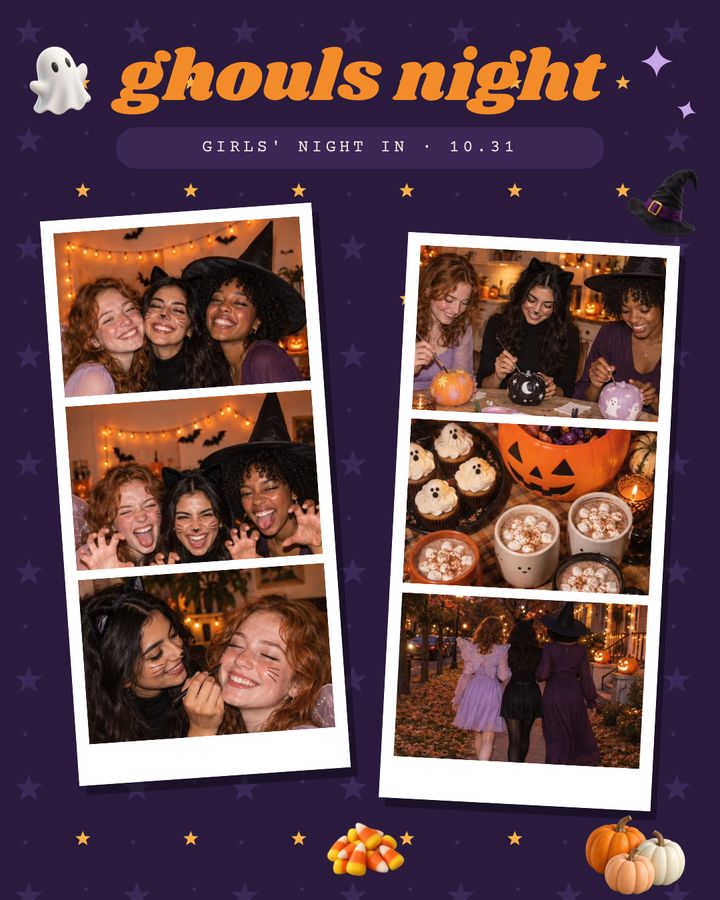
Start with Ghouls Night · Halloween collage ideas

Trending
25 designs
Ghouls NightPortrait 4:5 · 6 photos
Sleepover ClubPost 1:1 · 6 photos
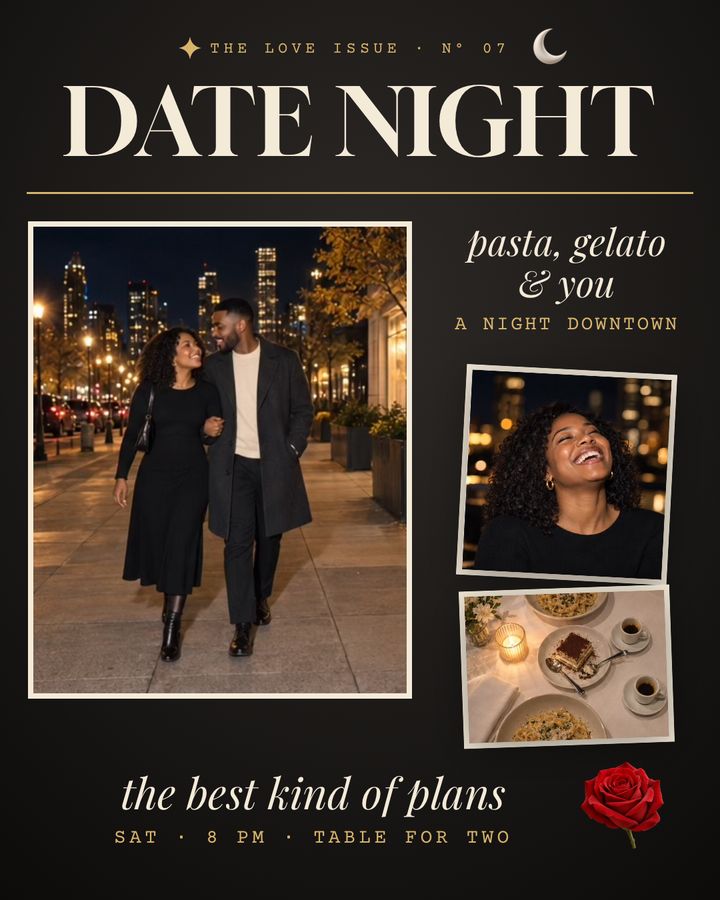
Date NightPortrait 4:5 · 3 photos
Powder DaysPortrait 4:5 · 5 photos
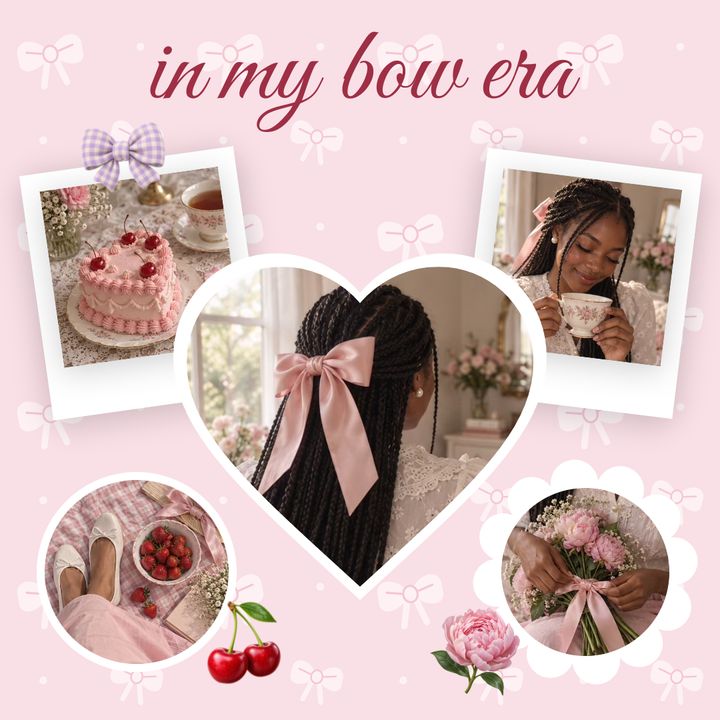
Bow EraPost 1:1 · 5 photos
Cabin WeekendPortrait 4:5 · 6 photos

Love & Couple
12 designs · Dates and anniversaries
Date NightPortrait 4:5 · 3 photos
Photo BoothStory 9:16 · 6 photos
Arm in ArmPortrait 4:5 · 5 photos
Dinner for TwoStory 9:16 · 5 photos
First DatePortrait 4:5 · 3 photos
How We MetCarousel · 3 slides, 4:5 · 6 photos

Black & White
10 designs
Grainy DaysPost 1:1 · 5 photos
Monochrome PortraitPortrait 4:5 · 6 photos
Film NoirStory 9:16 · 6 photos
Light & ShadowPortrait 4:5 · 2 photos
Photo BoothStory 9:16 · 4 photos
Study in GreyPost 1:1 · 2 photos

Stories
9 designs
CurrentlyStory 9:16 · 6 photos
A Day in the LifeStory 9:16 · 5 photos
Month in ReviewStory 9:16 · 6 photos
This WeekStory 9:16 · 4 photos
Now PlayingStory 9:16 · 2 photos
Fit CheckStory 9:16 · 5 photos

Friends
11 designs · Sleepover and game night
Sleepover ClubPost 1:1 · 6 photos
Catch UpPortrait 4:5 · 3 photos
Core MemoriesCarousel · 2 slides, 4:5 · 6 photos
DoublesPortrait 4:5 · 3 photos
Girls' TripCarousel · 3 slides, 4:5 · 6 photos
Picnic DayPost 1:1 · 5 photos

Art
10 designs
Cut & PrintPost 1:1 · 5 photos
Art FairPortrait 4:5 · 3 photos
The OpeningCarousel · 3 slides, 4:5 · 6 photos
MoodboardPost 1:1 · 3 photos
Wall StoryStory 9:16 · 5 photos
Museum LabelPortrait 4:5 · 2 photos

Vision board
10 designs
Dream HomeCarousel · 3 slides, 4:5 · 5 photos
My Own HoursPost 1:1 · 3 photos
Places 2027Carousel · 3 slides, 1:1 · 6 photos
Quiet AmbitionPost 1:1 · 6 photos
Reading ListPortrait 4:5 · 3 photos
Small RitualsStory 9:16 · 2 photos

Portfolio
9 designs
Contact SheetStory 9:16 · 6 photos
On LocationStory 9:16 · 3 photos
North LightPost 1:1 · 3 photos
The Quiet HourPortrait 4:5 · 5 photos
Now BookingPortrait 4:5 · 4 photos
Still LifePortrait 4:5 · 6 photos

Wedding
11 designs · From engagement to honeymoon
Just EngagedPortrait 4:5 · 5 photos
City HallPortrait 4:5 · 2 photos
The First DancePortrait 4:5 · 6 photos
Forty YearsPost 1:1 · 5 photos
Getting ReadyStory 9:16 · 5 photos
HoneymoonCarousel · 2 slides, 4:5 · 6 photos

Family
11 designs · Everyday moments, together
Baby on the WayPost 1:1 · 4 photos
Family AlbumPost 1:1 · 5 photos
Evening WalkStory 9:16 · 3 photos
Grandma’s RecipePortrait 4:5 · 4 photos
In the GardenPost 1:1 · 3 photos
Lake HouseCarousel · 3 slides, 4:5 · 6 photos

Baby
10 designs
Big SisterPortrait 4:5 · 3 photos
Welcome HomePortrait 4:5 · 5 photos
Turning OnePost 1:1 · 5 photos
First StepsStory 9:16 · 3 photos
Our First TripCarousel · 3 slides, 4:5 · 6 photos
Month by MonthCarousel · 3 slides, 4:5 · 6 photos

Travel
14 designs · Trips and city days
Riviera PolaroidsPost 1:1 · 3 photos
Madrid CaféStory 9:16 · 2 photos
Out of OfficePortrait 4:5 · 5 photos
Highlands Road TripCarousel · 3 slides, 4:5 · 6 photos
City BreakCarousel · 3 slides, 4:5 · 6 photos
MenorcaPortrait 4:5 · 3 photos

Fashion
12 designs · Outfits and styled looks
Fits of the WeekPortrait 4:5 · 6 photos
Bow EraPost 1:1 · 5 photos
The Coat EditCarousel · 3 slides, 4:5 · 6 photos
Knit SeasonPortrait 4:5 · 3 photos
Off DutyPortrait 4:5 · 2 photos
Outfit FormulaPost 1:1 · 4 photos

Celebrate
1 design
Birthday EraPost 1:1 · 5 photos

Pets
12 designs · Photos of your pets
Coffee DateStory 9:16 · 5 photos
Meet My RoommateStory 9:16 · 6 photos
Brave TodayStory 9:16 · 3 photos
Cat DumpCarousel · 3 slides, 4:5 · 6 photos
CloverPortrait 4:5 · 3 photos
Five TodayStory 9:16 · 6 photos

Lifestyle
6 designs · Routines and weekend dumps
Weekend DumpPortrait 4:5 · 6 photos
Pilates PrincessStory 9:16 · 5 photos
Get Ready With MeCarousel · 3 slides, 4:5 · 6 photos
Run ClubPost 1:1 · 5 photos
Shelf CarePortrait 4:5 · 4 photos
Clay DayPost 1:1 · 6 photos

Seasons
12 designs · Photos for every season
Powder DaysPortrait 4:5 · 5 photos
Cabin WeekendPortrait 4:5 · 6 photos
Slow EveningsPortrait 4:5 · 3 photos
Market NightCarousel · 2 slides, 4:5 · 6 photos
Winter UniformPortrait 4:5 · 5 photos
Sunday WalksStory 9:16 · 3 photos

Special days
4 designs · Holidays and party nights
Ghouls NightPortrait 4:5 · 6 photos
Merry & MatchingCarousel · 2 slides, 4:5 · 5 photos
Same CrewPortrait 4:5 · 6 photos
Cookie SeasonPortrait 4:5 · 5 photos

Scrapbook
10 designs
Little DaysPost 1:1 · 5 photos
Sundays at Nana'sStory 9:16 · 5 photos
Our First PlacePortrait 4:5 · 3 photos
Class of 2026Carousel · 2 slides, 4:5 · 6 photos
Museum NotesStory 9:16 · 3 photos
HerbariumPost 1:1 · 3 photos

Shapes
10 designs
Dusk to DarkPortrait 4:5 · 4 photos
Form & LightPortrait 4:5 · 5 photos
Full TablePost 1:1 · 4 photos
Golden HourPortrait 4:5 · 5 photos
Night BitesPost 1:1 · 3 photos
Night LineCarousel · 2 slides, 4:5 · 5 photos
These are the 184 templates in the app today, in 19 categories.
How to use a template
- Open Grid Co and browse the templates on the Trends tab.
- Tap a template to open it in the editor.
- Add your photos, then change the text, stickers or background if you like.
- Tap Share to save it to Photos at Instagram size.
FAQ
Frequently asked questions
Are the collage templates free to use?
Grid Co is a free download, and free exports have a small "Grid Co" watermark. Grid Co Premium, Monthly or Yearly, is optional: it removes the watermark and unlocks every premium template. No account or sign-in needed.
Can I change a template?
Yes. Every template opens in the editor, where you add your own photos and can change the text, stickers, background, fonts and layout until it looks the way you want.
Which sizes and formats do the templates come in?
Story 9:16 (1080×1920), Portrait 4:5 (1080×1350) and Post 1:1 (1080×1080). There are also seamless carousels of 2 to 20 slides. Everything saves to Photos at Instagram size.
Can I add text or change the font on a template?
Yes. Tap any text in the editor to edit it, and choose from 48 fonts.
Can I add stickers or change the background of a template?
Yes. Add stickers from 13 packs (201 stickers), and swap the background for one of 62 designed backgrounds, a solid color or a photo backdrop.
