 Grid Co
Updated
Wedding Photo Collage
To make a wedding photo collage on iPhone, open Grid Co and start from one of 11 wedding templates, such as Just Married, The First Dance or Wildflower Wedding. Replace the photos with yours, change the words, and save. You can also build your own from a free layout. No account needed.



How it works
- Open Grid Co, go to Trends and open the Wedding category.
- Tap a template, then tap each photo to swap in one of your own.
- Change the sample words to your names, the date or a short line.
- Decide where it will be seen, then set Format to Post 1:1, Portrait 4:5 or Story 9:16.
- Tap Share and Save Image, or send the finished card straight to Instagram.
- 11 wedding templatesFrom save the date to first dance, with text and photos arranged.
- Type for names and vowsSet names, the date and a short line in any of 48 font families.
- Three formatsPost 1:1 is 1080×1080, Portrait 4:5 is 1080×1350 and Story 9:16 is 1080×1920.
What can you put in a wedding photo collage?
A wedding photo collage can hold the whole day or one moment, from a save the date to the first dance. Grid Co has 11 wedding templates for this, six free and five Premium, and you can also build your own from a free layout.
- Save the date, with a photo and the date
- Getting ready, ceremony and first dance in one frame
- A menu or table card with a few photos
- An engagement announcement
- A thank-you card with the best photos
- An anniversary collage, one photo per year
Which wedding template should you choose?
A wedding photo collage template should match the job and the format. Pick Save the Date for a square announcement, Just Married or City Hall for a post, and a Premium carousel such as Honeymoon or The Daily Vow when you have six photos to spread across slides.
- Save the Date: square, 3 photos, free
- City Hall: 4:5, 2 photos, free
- Just Married: 4:5, 4 photos, free
- Wildflower Wedding: Story, 3 photos, free
- The First Dance: 4:5, 6 photos, Premium
- Honeymoon: two-slide carousel, 6 photos, Premium
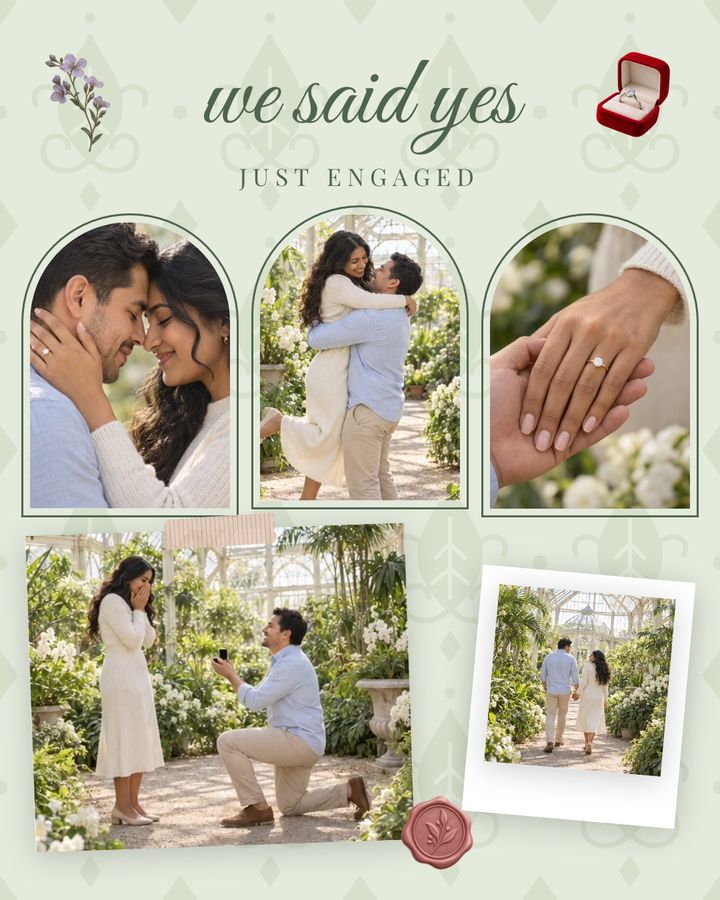
Wedding templates come with sample words you can replace: "we said yes" on Just Engaged, "just MARRIED" on Just Married, "the first dance" and "AND EVERY SONG AFTER" on The First Dance, and "A COUNTRY WEDDING" with the day, month and year on Wildflower Wedding. Wedding in Black & White, Wedding Album (Scrapbook) and Wedding Story (Portfolio) sit in other categories and are all Premium.
| Template | Format | Photos | Access |
|---|---|---|---|
| City Hall | Portrait 4:5 | 2 | Free |
| The First Dance | Portrait 4:5 | 6 | Premium |
| Forty Years | Post 1:1 | 5 | Premium |
| Getting Ready | Story 9:16 | 5 | Premium |
| Honeymoon | Carousel 4:5, 2 slides | 6 | Premium |
| Just Engaged | Portrait 4:5 | 5 | Free |
| Just Married | Portrait 4:5 | 4 | Free |
| Save the Date | Post 1:1 | 3 | Free |
| The Daily Vow | Carousel 4:5, 3 slides | 6 | Premium |
| The Menu | Portrait 4:5 | 3 | Free |
| Wildflower Wedding | Story 9:16 | 3 | Free |
FAQ
Frequently asked questions
How do I make a wedding collage on iPhone?
Open a wedding template, swap in your photos and words, and save the result.
How many wedding templates are there?
11 in the Wedding category: 6 free and 5 Premium.
Can I make a collage without a template?
Yes. Start from any of the 215 free layouts, add your photos and put your names on with Text.
Can I make a save the date or a thank-you card?
Yes. Put the names and date, or a thank-you line, on the picture and share it as an image.
How big is a wedding collage?
Post 1:1 is 1080×1080, Portrait 4:5 is 1080×1350 and Story 9:16 is 1080×1920.
Do I need Premium to make a wedding collage?
No. Six of the 11 wedding templates and all 215 layouts are free. Premium only removes the small "Grid Co" watermark and unlocks the Premium templates.
