 Grid Co
December · Christmas and New Year
Christmas photo card collage
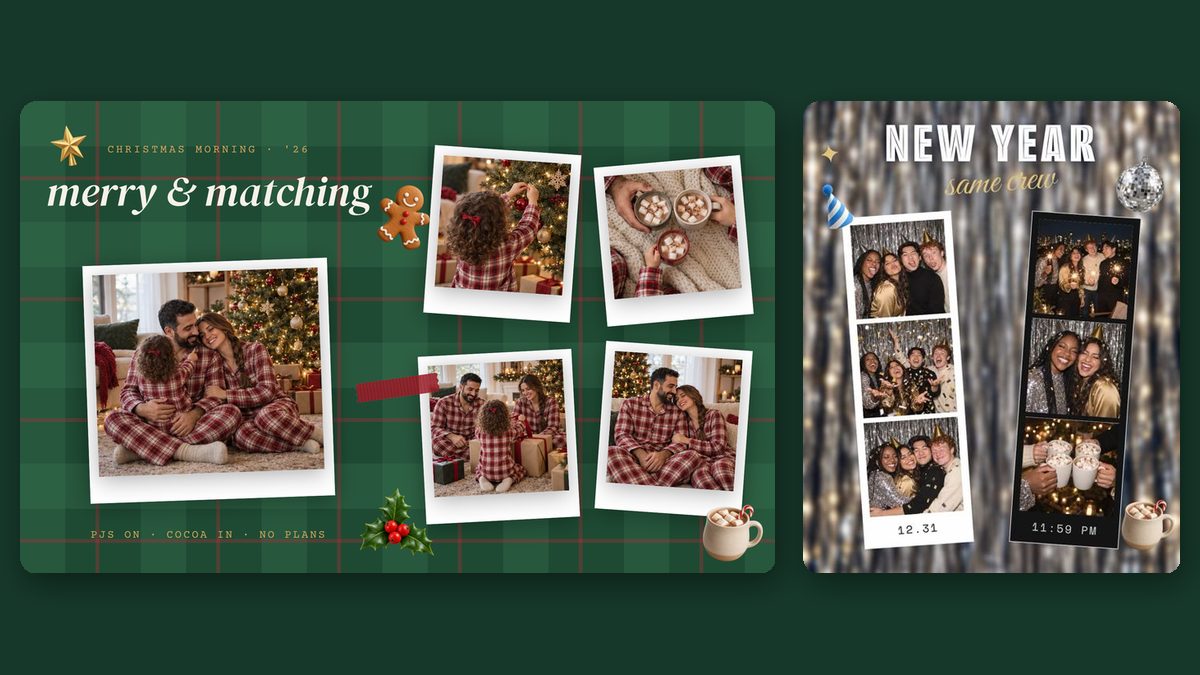
A Christmas photo card collage puts a few of this year’s family photos and a short greeting on one card you can send from your phone. In Grid Co, start from the free Merry & Matching template or any layout, add stickers such as a wreath or a snow globe, then save the card as an image.



How it works
How do you make a Christmas photo card on iPhone?
Pick the photos first, then let one of them lead the card.
- Choose three to six photos from the year, with one clear photo of everyone together.
- Open Grid Co, go to Trends and open Special days for Merry & Matching, or pick a free layout.
- Tap Add, then Text, and write a short greeting with your names and the year.
- Add stickers from the Christmas pack, such as a wreath, string lights or a snow globe.
- Choose Post 1:1, Portrait 4:5 or Story 9:16, then tap Share and Save Image.
What should a Christmas photo card include?
A Christmas photo card usually has one main photo of the family, two to five smaller photos from the year and a short greeting. Keep the greeting to one line, add your names and 2026, and leave space around the main photo so faces stay easy to see on a phone screen.
- One photo with everyone looking at the camera
- A moment from a trip or a summer day
- The pet, if you have one
- A one-line greeting from all of you
- Your names and the year
- Two or three stickers, not ten
Which Grid Co templates suit a Christmas or New Year card?
Grid Co has two free templates for the season. Merry & Matching is a Christmas morning carousel with plaid, polaroid frames and stickers across two slides. Same Crew is a New Year photo strip marked 12.31 and 11:59 PM. You can change every word on both, and your photos replace the samples.
| Template | Category | Format | Access |
|---|---|---|---|
| Merry & Matching | Special days | Portrait 4:5, 2 slides | Free |
| Same Crew | Special days | Portrait 4:5 | Free |
| Snow Day | Seasons | Portrait 4:5 | Free |
| Market Night | Seasons | Portrait 4:5, 2 slides | Premium |
Christmas card or New Year card?
A Christmas card or a New Year card can use the same photos; only the words and stickers change. A New Year card suits friends who do not celebrate Christmas and can still go out in the first days of January. In Grid Co, switch the greeting, or start from Same Crew instead.
- Swap Merry Christmas for Happy New Year
- Use the year 2027 as a large title
- Keep the Christmas stickers for the Christmas version only
FAQ
Questions about Christmas photo cards
Can Grid Co print or mail my card?
No. Grid Co saves the card as an image in Photos. You can send it in a message or by email, or give the file to a print service you choose.
Are the Christmas stickers free?
Yes. Stickers, text and all 215 layouts are free. Free exports carry a small Grid Co watermark, which the optional Premium subscription removes.
What size is the card?
Post is 1080 × 1080 pixels, Portrait 1080 × 1350 and Story 1080 × 1920. Portrait 4:5 works well in messages and on Instagram.
